Blogger Buzz: Add a virtual tip jar to your blog
Google Checkout as competition to Flattr.
I have not made reasonable amounts of money through Flattr yet; I have no idea, how it works for real writers; question is, whether Google Checkout will make it easier to earn money through sharing "text" on the web.
Here is the Google Checkout Blog.
The article mentioned above is in fact a promotion link between Google's Blogger department and Google's Checkout department.
Friday, May 20, 2011


Wednesday, May 18, 2011
Tuesday, May 17, 2011
how does Skype show you to yourself?
Skype on Mac OS X shows you, as if you look into a mirror – I find that rather "natural" and "usual", just what I prefer.
Skype on Windows seems to show you "the other way round" – like other people see you.
If you are having a video conversation via Skype, you will occasionally look whether your face is still rather centered within the shown window. If you move or turn left and right and if that's not shown like in a mirror, I find that weird.
Skype on Windows seems to show you "the other way round" – like other people see you.
If you are having a video conversation via Skype, you will occasionally look whether your face is still rather centered within the shown window. If you move or turn left and right and if that's not shown like in a mirror, I find that weird.
Monday, May 16, 2011
O'Reilly Media book: Perl Cookbook
Perl Cookbook, Second Edition - O'Reilly Media
Chapter 22 XML
Chapter 22 XML
- 22.9: Reading and Writing RSS Files -> meta feeds
useful scripts in their example code at http://examples.oreilly.com/9781565922433/:
- oreilly--Perl_Cookbook--code/ch09/symirror – build spectral forest of symlinks
- …
"meta feeds" bookmark collection
- Ruby Cookbook: 11.16 A Simple Feed Aggregator
- Wicked Cool Ruby Scripts: #13 RSS Parsing
- Spidering Hacks: Hack #69 – Aggregating RSS and Posting Changes (in Perl)
- Perl and XML: Chapter 9 RSS, SOAP, and Other XML Applications
- Perl Cookbook: Chapter 22 XML: Reading and Writing RSS Files
- "Webbots, Spiders, and Screen Scrapers (2nd ed.)" (in PHP) by Michael Schrenk, Chapter 12
- …
book: Webbots, Spiders, and Screen Scrapers, by Michael Schrenk
Official Web Site: Webbots, Spiders, and Screen Scrapers, by Michael Schrenk
Chapter 12 features aggregation "webbots".
book: Wicked Cool Ruby Scripts | No Starch Press
Wicked Cool Ruby Scripts | No Starch Press
- Chapter 1: General Purpose Utilities
- Chapter 2: Website Scripting :
#13 RSS Parsing -> meta feeds - Chapter 3: Li(U)nix System Administration
- Chapter 4: Picture Utilities
- Chapter 5: Games and Learning Tools
- Chapter 6: String Utilities
- Chapter 7: Servers and Scrapers
- Chapter 8: Arguments and Documentation: very nice examples on command line processing and inline documentation à la RDoc suitable for nice usage messages
- Chapter 9: Sorting Algorithms
- Chapter 10: Writing a Metasploit 3.1 Module with Ruby
RSS-2-HTML, Atom-2-HTML
I need to display a few syndication feeds as HTML, and I am seeking software in Ruby or Perl (i.e. neither PHP, nor anything heavy at all): "rss2html", "atom2html".
- something in Perl for RSS (source code)
- …
$ cpanm XML::RSS
…
Friday, May 13, 2011
Rosetta (software) - Wikipedia, the free encyclopedia
Rosetta (software) - Wikipedia, the free encyclopedia :
Rosetta is a lightweight dynamic translator for Mac OS X distributed by Apple. It enables applications compiled for the PowerPC family of processors to run on Apple systems that use Intel processors. Rosetta is based on Transitive Corporation's QuickTransit technology,[1] and is a key part of Apple's strategy for the transition of their Macintosh line from PowerPC to Intel processors as it enables pre-existing Mac OS X software to run on the new platform without modification. …So in like 2005/2006 they thought, Intel Macs would not be sufficiently fast to execute software with "high computational needs" through Rosetta, but >2010 Intel Macs are powerful enough to do even that. Somebody told, his old PPC Mac Photoshop runs nicely on his 2010 Snow Leopard MacBook Pro, and he was very delighted about that.
Rosetta is part of the Mac OS X for Intel operating system. It translates G3, G4, and AltiVec instructions; however, it does not translate G5 instructions. Therefore, applications that rely on G5-specific instruction sets must be modified by their developers to work on Intel-based Macs. According to Apple, applications with heavy user interaction but low computational needs (such as word processors) are well suited to translation via Rosetta, while applications with high computational needs (such as raytracers or Adobe Photoshop) are not. …
Thursday, May 12, 2011
the "Long Tail" of a probability distribution (statistics)
Long Tail - Wikipedia, the free encyclopedia
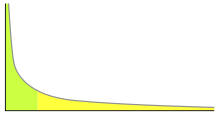 |
| An example of a power law graph showing popularity ranking. To the right is the long tail; to the left are the few that dominate. Notice that the areas of both regions match. |
Tuesday, May 10, 2011
Friday, May 6, 2011
Thursday, May 5, 2011
Tuesday, May 3, 2011
n-up several images
I need to compare like 100 pairs of images. I started by looking at them immediately one after the other. I don't feel comfortable with that. I want to see both of them together. I will create auxiliary images using ImageMagick and making use of this recipe:
Now I am going to create the auxiliary images in a shell script…
Q: another task might be this: how do I also reduce the size of every single image, so that they all fit on one "page"?
That's not really relevant, as the usual image viewers are able to display image in just the right size on your screen.
convert -append input1.jpg input2.jpg input3.jpg -border 5 output.jpgIf I try doing this using GraphicsMagic, I don't see the border.
Now I am going to create the auxiliary images in a shell script…
Q: another task might be this: how do I also reduce the size of every single image, so that they all fit on one "page"?
That's not really relevant, as the usual image viewers are able to display image in just the right size on your screen.
Subscribe to:
Posts (Atom)


