Showing posts with label virtual machines. Show all posts

Monday, July 8, 2013

Rick Sladkey's NFS utility "showmount"

showmount is quite useful, if you want to examine the properties of NFS shares instead of just mounting it. I used it, when I found it troublesome to mount a share from a (Linux) virtual machine behind a NAT router (actually a VirtualBox VM host).

Tuesday, May 28, 2013

openSUSE-12.3 : upgrading again …

The least risky approach to upgrading a system should be by cloning it as a virtual machine, and upgrade the clone. That's what I did this time, and it worked, and I am rather happy.

Of course upgrades always come with unexpected effort.


  • I downloaded the "Network / 64 Bit PC" ISO image,
  • moved it to my folder with DVD/CD ISO images,
  • and included it in the virtual machine's "Storage / Controller / IDE Controller" section.
  • I let VirtualBox create a new MAC address in the "Network / Adapter 1" section. (You will have to drop the old network interface later within YaST, and create and set up a new one then, once you have a running system.)
  • Then I started the VM,
  • it booted from this ISO image,
  • and I went the update installation path.
  • A couple of hours later (next morning!), I found the installation hanging on the Packman repository. I simply ignored that for the time being.


For quite some time I used /etc/init.d/boot.crypto as a way to mount encrypted file systems on the command line.

$ /etc/init.d/boot.crypto start  MOUNTPOINT
$ /etc/init.d/boot.crypto status MOUNTPOINT

$ /etc/init.d/boot.crypto stop   MOUNTPOINT

 (Yes, of course, there is also a GUI way to do this). Apparently that facility got dropped. The file simply disappeared. /etc/crypttab still exists, but within /etc/init.d/ I could not find any file dealing with it. I found this SDB article on "Encrypted filesystems" then, which had a slightly outdated section on systemd support [Link], that deals with this topic. I updated that wiki article to reflect the change coming with 12.3. I am rather excited to see, whether somebody else will notice that, maybe discuss the matter with me, and maybe also even further update the article. This is how to mount your encrypted file system now:

$ systemctl start  MOUNTPOINT
$ systemctl status MOUNTPOINT
$ systemctl stop   MOUNTPOINT

This looks pretty simple too me. I like it.

Update 2013-05-29:

Thursday, March 21, 2013

VirtualBox 4.2.10 fixes a number of crashing bugs

VirtualBox 4.2.10 fixes a number of crashing bugs: The latest version of Oracle's open source virtualisation package fixes several crashing problems and other bugs, including compilation problems with the rc0 release of version 3.9 of the Linux kernel


Tuesday, February 26, 2013

Pre-Built VirtualBox VMs for Developers

VirtualBox VMs for Developers

This one looks particularly well-suited for excercising your Oracle DB skills:
It includes: Oracle Database 11g Release 2 Enterprise Edition.

This pre-built VM gets you around the hassle of setting up that beast
  • on your OS,
  • or even worse: under an OS derivate that you are not perfectly familiar with,
  • or somewhere, where you simply don't want to have it.
I would certainly love to make use of this DB server from within the VM host or other VM sibling guests. 

Wednesday, February 22, 2012

Monday, October 10, 2011

installing Windows 8 in a Virtual Box VM on OS X

I had read an article that recommended that combination (except for OS X). I am going to give it a try.
I am doing a fresh uninstall, not an upgrade.

Update 2011-10-11:
I had a couple of tries, where the installation just stalled below 20% of "Expanding Windows files".
Currently it's passing the 30% mark ... .
Finally left all the language etc. defaults, and it just ran through.

installing Visual Studio within a WinXP VM on OS X

That looks like a really, really funny idea to me.
This is only an evaluation version of VS, and I intend to continue working with that evaluation version through occasional re-installations in fresh snapshots of the mother-VM.
I got to try a C#/.net software package, and I hope this approach will help me.

I downloaded the 4 files (1 * .exe, 4 * .rar) using wget. That took quite a while, even through VDSL.

The installation also is quite a lengthy process, although it's not asking me a lot of question. I went for the full installation. You never really know, what you are going to miss otherwise. The installation succeeded.

I got the software in question to get executed.

Wednesday, August 3, 2011

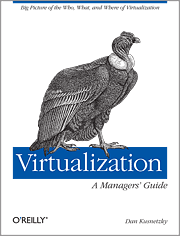
Virtualization: A Manager's Guide - O'Reilly Media

Virtualization: A Manager's Guide - O'Reilly Media


dmoz.org lists VirtualBox et al. just as Computers: Emulators: Intel x86 Architecture.
They show this in "see also": Computers: Software: Operating Systems: x86.

The author: Dan Kusnetzky.

From the TOC:
  1. A Model of Virtualization (the Kusnetzky Group model of virtualization)
  2. Access Virtualization: Providing Universal Access
  3. Application Virtualization: Application Isolation, Delivery and Performance
  4. Processing Virtualization: Doing System Tricks // Oracle's VirtualBox goes here
  5. Network Virtualization: Controlling the View of the Network
  6. Storage Virtualization: Where Are Your Files and Applications?
  7. Security for Virtual Environments: Guarding the Treasure
  8. Management for Virtual Environments
  9. Using Virtualization: The Right Tool for the Job
Very, very interesting reading!

Will be a good source for clarifying, what kind of virtualization is actually meant under certain circumstances. Very good reference material!

Sunday, July 24, 2011

installing WinXP in a VirtualBox on my MacBook Pro running Mac OS X Lion

VirtualBox

Q: Why do I need Windows at all?
A: for accounting software like Lexware Quicken, Lexware Financial Office.

Update 2011-07-24 11:51
I feel like somebody put my hands in chains. This WinXP installation binds all possible resources on my Mac, and this is just my favourite machine. I will have to wait for that installation to complete, then register that installation, then do all possible updates, than install Lexware Quicken (with all possible updates), than migrate its data, than install Lexware Financial Office (with all possible updates), ...

Update 2011-07-24 12:20
What shall I get in order to comfort my patience?
Rum, cachaca, beer, coffee, ...? I think, I go for coffee. Doesn't disturb the remainder of the day.

Update 2011-08-04
Lesson learned by now: virtualization eats memory. I you spend a little on extra memory, it will run smoothly. It's basically not a matter of CPU cycles, but only of enough memory. Don't hesitate too long, before getting that.

Wednesday, June 9, 2010

Parrot, the virtual machine

I am rather astonished:  Parrot has a rather lengthy list of existing client languages in its Wikipedia article, and there is an even longer one on Parrot.org. I wonder, how lively they really are.