Showing posts with label virtualization. Show all posts
Thursday, March 21, 2013
VirtualBox 4.2.10 fixes a number of crashing bugs
VirtualBox 4.2.10 fixes a number of crashing bugs: The latest version of Oracle's open source virtualisation package fixes several crashing problems and other bugs, including compilation problems with the rc0 release of version 3.9 of the Linux kernel

Labels:
virtual machines,
VirtualBox,
virtualization
Tuesday, June 19, 2012
O'Reilly Media book: VMware Cookbook
VMware Cookbook: 
With scores of step-by-step solutions, this cookbook helps you work with VMware ESXi in a wide range of network environments. You’ll not only learn the basics—how to pool resources from hardware servers, computer clusters, networks, and storage, and then distribute them among virtual machines—but also how to overcome the stumbling blocks you’ll encounter when you monitor systems, troubleshoot problems, and deal with security. This expanded second edition covers recent advances in vCloud Director and vShield cloud security.
got it on 2012-07-29.
With scores of step-by-step solutions, this cookbook helps you work with VMware ESXi in a wide range of network environments. You’ll not only learn the basics—how to pool resources from hardware servers, computer clusters, networks, and storage, and then distribute them among virtual machines—but also how to overcome the stumbling blocks you’ll encounter when you monitor systems, troubleshoot problems, and deal with security. This expanded second edition covers recent advances in vCloud Director and vShield cloud security.
got it on 2012-07-29.
Labels:
cloud computing,
OReilly,
virtualization,
VMware
Sunday, October 16, 2011
Wednesday, August 24, 2011
SmartOS brings KVM to the Solaris kernel - The H Open Source: News and Features
SmartOS brings KVM to the Solaris kernel - The H Open Source: News and Features: A team of developers from cloud provider Joyent has ported the Linux kernel hypervisor to Illumos' open source OpenSolaris kernel to create a new operating system
definition of the KVM, the Linux Kernel-based Virtual Machine
Labels:
Linux,
virtualization
Tuesday, August 16, 2011
Friday, August 5, 2011
a WinXP guest of a VirtualBox installation on Mac OS X Lion: problems with time synchronization
How to install VirtualBox Guest Additions - Tutorial
I guess (just like any user of a Processing Virtualization solution) I experienced problems with time synchronization within my guest OS. I searched the web for that, and I came across the above article. In the VirtualBox context "Guest Additions" is the term. I wasn't able to find the right hints on VirtualBox.org, but the above article pointed me to "Devices > Install Guest Additions" within the menu of the guest VM app. That brought a superb quality improvement, including the resizability of the guest VM app window. I really love that.
Labels:
VirtualBox,
virtualization
Wednesday, August 3, 2011
MacBook Pro: successfully upgrading memory [update]
MacBook Pro: How to remove or install memory
Mine is a "MacBook Pro (17-inch, Mid 2009)"
The compatibility list said, I should add "PC3 -8500 DDR3 1066 MHz type RAM", but that wasn't available at my dealer (Saturn Berlin Europa-Center), so instead I installed "2*4 GB 1333 MHz DDR3" (), and that boots nice and still works very nice.
My "About This Mac > Memory" now says:
The 2 new memory bars cost me EUR 100 at Saturn Berlin Europa-Center, not like EUR 140 as at Gravis. Not all screws went in as nice, as they were before this procedure. Otherwise this was really, really easy.
Now I run VirtualBox with WinXP inside (Quicken running inside there), and it feels like walking on air, not like on stones.
The compatibility list said, I should add "PC3 -8500 DDR3 1066 MHz type RAM", but that wasn't available at my dealer (Saturn Berlin Europa-Center), so instead I installed "2*4 GB 1333 MHz DDR3" (), and that boots nice and still works very nice.
My "About This Mac > Memory" now says:
Your Mac contains 2 memory slots, each of which accepts a 1333 MHz DDR3 memory module.Funny, isn't it?!!
The 2 new memory bars cost me EUR 100 at Saturn Berlin Europa-Center, not like EUR 140 as at Gravis. Not all screws went in as nice, as they were before this procedure. Otherwise this was really, really easy.
Now I run VirtualBox with WinXP inside (Quicken running inside there), and it feels like walking on air, not like on stones.
Labels:
MacBook Pro,
VirtualBox,
virtualization
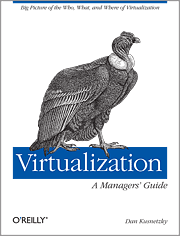
Virtualization: A Manager's Guide - O'Reilly Media
dmoz.org lists VirtualBox et al. just as Computers: Emulators: Intel x86 Architecture.
They show this in "see also": Computers: Software: Operating Systems: x86.
The author: Dan Kusnetzky.
From the TOC:
Will be a good source for clarifying, what kind of virtualization is actually meant under certain circumstances. Very good reference material!
dmoz.org lists VirtualBox et al. just as Computers: Emulators: Intel x86 Architecture.
They show this in "see also": Computers: Software: Operating Systems: x86.
The author: Dan Kusnetzky.
From the TOC:
- A Model of Virtualization (the Kusnetzky Group model of virtualization)
- Access Virtualization: Providing Universal Access
- Application Virtualization: Application Isolation, Delivery and Performance
- Processing Virtualization: Doing System Tricks // Oracle's VirtualBox goes here
- Network Virtualization: Controlling the View of the Network
- Storage Virtualization: Where Are Your Files and Applications?
- Security for Virtual Environments: Guarding the Treasure
- Management for Virtual Environments
- Using Virtualization: The Right Tool for the Job
Will be a good source for clarifying, what kind of virtualization is actually meant under certain circumstances. Very good reference material!
Labels:
OReilly,
virtual machines,
VirtualBox,
virtualization
Monday, July 25, 2011
MacBook Pro: How to remove or install memory / successfully upgrading …
MacBook Pro: How to remove or install memory:
mine is a "MacBook Pro (17-inch, Mid 2009)"
Update 2011-08-03
The compatibility list said, I should add PC3 -8500 DDR3 1066 MHz type RAM, but that wasn't available at my Saturn Berlin Europa-Center, so instead I installed "2*4 GB 1333 MHz DDR3" (cost me EUR 100, not like EUR 140 as at Gravis), and that boots nice and still works very nice.
My "About This Mac > Memory" now says:
Funny, isn't it?!!
Now I run VirtualBox with WinXP inside, and I still feel like walking on air, not like on stones.
Update 2011-08-03
The compatibility list said, I should add PC3 -8500 DDR3 1066 MHz type RAM, but that wasn't available at my Saturn Berlin Europa-Center, so instead I installed "2*4 GB 1333 MHz DDR3" (cost me EUR 100, not like EUR 140 as at Gravis), and that boots nice and still works very nice.
My "About This Mac > Memory" now says:
Your Mac contains 2 memory slots, each of which accepts a 1333 MHz DDR3 memory module.
Funny, isn't it?!!
Now I run VirtualBox with WinXP inside, and I still feel like walking on air, not like on stones.
Labels:
hardware wishlist,
MacBook Pro,
VirtualBox,
virtualization
Location:
Wilhelmshöhe, Kassel, Germany
Sunday, July 24, 2011
installing WinXP in a VirtualBox on my MacBook Pro running Mac OS X Lion
VirtualBox
Q: Why do I need Windows at all?
A: for accounting software like Lexware Quicken, Lexware Financial Office.
Update 2011-07-24 11:51
I feel like somebody put my hands in chains. This WinXP installation binds all possible resources on my Mac, and this is just my favourite machine. I will have to wait for that installation to complete, then register that installation, then do all possible updates, than install Lexware Quicken (with all possible updates), than migrate its data, than install Lexware Financial Office (with all possible updates), ...
Update 2011-07-24 12:20
What shall I get in order to comfort my patience?
Rum, cachaca, beer, coffee, ...? I think, I go for coffee. Doesn't disturb the remainder of the day.
Update 2011-08-04
Lesson learned by now: virtualization eats memory. I you spend a little on extra memory, it will run smoothly. It's basically not a matter of CPU cycles, but only of enough memory. Don't hesitate too long, before getting that.
Update 2011-07-24 11:51
I feel like somebody put my hands in chains. This WinXP installation binds all possible resources on my Mac, and this is just my favourite machine. I will have to wait for that installation to complete, then register that installation, then do all possible updates, than install Lexware Quicken (with all possible updates), than migrate its data, than install Lexware Financial Office (with all possible updates), ...
Update 2011-07-24 12:20
What shall I get in order to comfort my patience?
Rum, cachaca, beer, coffee, ...? I think, I go for coffee. Doesn't disturb the remainder of the day.
Update 2011-08-04
Lesson learned by now: virtualization eats memory. I you spend a little on extra memory, it will run smoothly. It's basically not a matter of CPU cycles, but only of enough memory. Don't hesitate too long, before getting that.
Labels:
virtual machines,
VirtualBox,
virtualization
Subscribe to:
Posts (Atom)